动态滑动列表
在游戏的UI开发中,经常会使用滑动列表来展示游戏中的数据,玩家通过滑动查看更多的游戏数据。
如果列表项过多的话(例如游戏的排行榜,通常有超过一百个的列表项),一次性把所有列表项都渲染出来,会导致内存资源的浪费,影响游戏性能。其实手机屏幕一屏能够显示的列表项数目是有限的,我们在界面打开的时候可以只渲染可见的列表项,其它不可见的列表项完全可以在需要显示的时候再渲染。这就是动态滑动列表的原理,也叫做循环滑动列表。
cocos 的scroll view没有提供动态滑动列表的功能,于是我们自己实现了一个。
布局
滑动列表的布局结构如下图,为了对齐和方便布局的是scrollview,view和content的锚点都是(0.5,1)

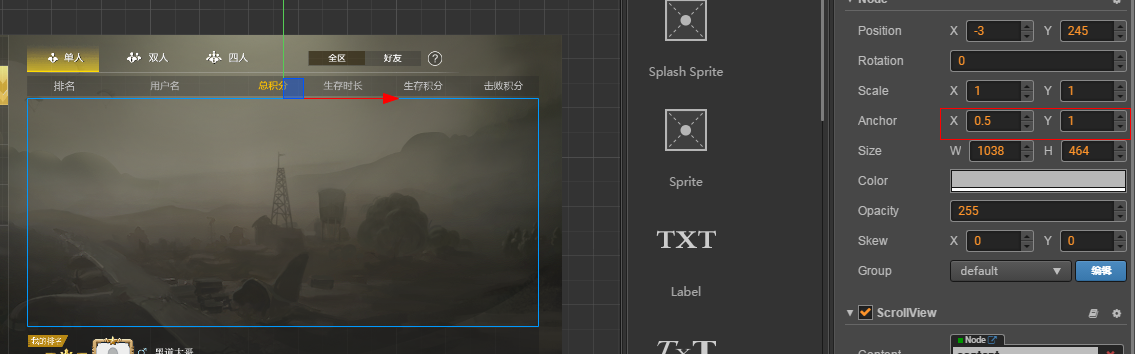
代码主要由两部分组成,listitemctrl 和 listviewctrl。
listitemctrl
1
2
3
4
5
6
7
8
9
10
11
12
13
| cc.Class({
extends: cc.Component,
properties: {
indexID: 0,
dataID: 0
},
updateItem: function(indexID, dataID, data) {
this.indexID = indexID;
this.dataID = dataID;
},
});
|
listitemctrl是列表项的基类,提供了基础的属性和初始化的接口。
listviewctrl
1
2
3
4
5
6
7
8
9
10
11
12
13
14
15
16
17
18
19
20
21
22
23
24
25
26
27
28
29
30
31
32
33
34
35
36
37
38
39
40
41
42
43
44
45
46
47
48
49
50
51
52
53
54
55
56
57
58
59
60
61
62
63
64
65
66
67
68
69
70
71
72
73
74
75
76
77
78
79
80
81
82
83
84
85
86
87
88
89
90
91
92
93
94
95
96
97
98
99
100
101
102
103
104
105
106
107
108
109
110
111
112
113
114
115
116
117
118
119
120
121
122
123
124
125
126
127
128
129
130
131
132
133
134
135
136
137
138
139
140
141
142
143
144
145
| cc.Class({
extends: cc.Component,
properties: {
itemTemplate: {
default: null,
type: cc.Prefab
},
scrollView: {
default: null,
type: cc.ScrollView
},
spawnCount: 0,
spacing: 0,
_dataList: null,
_itemHeight:0,
_inited: false,
},
onLoad: function () {
this.content = this.scrollView.content;
this.items = [];
this.initialize();
this.updateTimer = 0;
this.updateInterval = 0.2;
this.lastContentPosY = 0;
},
initialize: function () {
let item = cc.instantiate(this.itemTemplate);
this.content.addChild(item);
this.items.push(item);
this._itemHeight = this.items[0].height;
this.spawnCount = (this.scrollView.node.height + 6 * (this._itemHeight + this.spacing)) / this._itemHeight;
this.spawnCount = parseInt(this.spawnCount);
for (let i = 1; i < this.spawnCount; ++i) {
item = cc.instantiate(this.itemTemplate);
this.content.addChild(item);
this.items.push(item);
}
this.reorderItems(0);
},
initWithData: function(dataList)
{
this._inited = true;
this._dataList = dataList;
this.content.height = dataList.length * (this._itemHeight + this.spacing) + this.spacing;
this.reorderItems(dataList.length);
for(let i = 0;i< this.content.children.length && i< dataList.length;i++)
{
let item = this.content.children[i];
item.getComponent('ListItemCtrl').updateItem(i,i,dataList[i]);
}
this.scrollToFixedPosition();
},
reorderItems: function(itemCount)
{
let curCount = itemCount > this.spawnCount ? this.spawnCount:itemCount;
if(this.content.children.length < curCount)
{
while(this.content.children.length < curCount && this.node.children.length > 0)
{
this.node.children[0].active = true;
this.node.children[0].parent = this.content;
}
}
else
{
while(this.content.children.length > curCount)
{
this.content.children[0].active = false;
this.content.children[0].parent = this.node;
}
}
for (let i = 0; i < this.content.children.length; ++i) {
let item = this.content.children[i];
item.setPosition(0, -item.height * (0.5 + i) - this.spacing * (i + 1));
}
},
getPositionInView: function (item) {
let worldPos = item.parent.convertToWorldSpaceAR(item.position);
let viewPos = this.scrollView.node.convertToNodeSpaceAR(worldPos);
return viewPos;
},
update: function(dt) {
this.updateTimer += dt;
if (!this._inited || this.updateTimer < this.updateInterval)
{
return;
}
this.updateTimer = 0;
let items = this.items;
let isDown = this.scrollView.content.y < this.lastContentPosY;
let offset = (this._itemHeight + this.spacing) * this.content.children.length;
let buffUp = 3 * (this._itemHeight + this.spacing);
let buffDown = -this.scrollView.node.height - buffUp;
for (let i = 0; i < items.length; ++i) {
let viewPos = this.getPositionInView(items[i]);
let itemLocalPos = items[i].position;
if (isDown) {
if (viewPos.y < buffDown && itemLocalPos.y + offset < 0) {
items[i].setPositionY(itemLocalPos.y + offset );
let item = items[i].getComponent('ListItemCtrl');
let dataID = item.dataID - items.length;
if(dataID >=0 && dataID < this._dataList.length)
{
item.updateItem(i, dataID , this._dataList[dataID]);
}
}
} else {
if (viewPos.y > buffUp && itemLocalPos.y - offset > -this.content.height) {
items[i].setPositionY(itemLocalPos.y - offset );
let item = items[i].getComponent('ListItemCtrl');
let dataID = item.dataID + items.length;
if(dataID >=0 && dataID < this._dataList.length)
{
item.updateItem(i, dataID , this._dataList[dataID]);
}
}
}
}
this.lastContentPosY = this.scrollView.content.y;
},
scrollToFixedPosition: function () {
this.scrollView.scrollToOffset(cc.p(0, 0), 0.1);
}
});
|
listviewctrl是动态列表的具体实现,首先我们在initialize中根据当前可见视野计算了需要缓存的列表项的数目(上下在视野外多创建了3个列表项,一共6个),然后将列表项都创建出来,后面将使用这些列表项来展示所有的数据。
1
2
| //根据可视窗口的大小和列表项的高度计算缓存的列表项数目
this.spawnCount = (this.scrollView.node.height + 6 * (this._itemHeight + this.spacing)) / this._itemHeight;
|
最关键的操作是在update中,这里有一点需要指出的是,当列表在滑动的时候,scrollview移动的其实是列表项的父节点content,列表项是跟随父节点移动的,所以我们可以通过挪动列表项来用有限的列表项实现无限循环的效果。
在update中,每次都会遍历当前content中所有的列表项,并判断是否需要移动列表项的位置,这里分为两种情况,一种是下滑操作,另一种是上滑操作。如果当前处于下滑操作中,并且还没有达到列表的顶部,我们则会将最下面的列表项挪到最上面,同时重新刷新列表项的内容。
这里涉及到两个判断:
1
| if (viewPos.y < buffDown && itemLocalPos.y + offset < 0)
|
其中,viewPos是我们调用getPositionInView得到的,是当前的item在scrollview中的坐标,‘viewPos.y < buffDown’ 表示这个item已经滚出可视范围的下边界三个item的高度。
itemLocalPos是item在content中的局部坐标(跟viewPos是不一样的),‘itemLocalPos.y + offset < 0’ 的意思是从当前位置往上走offset的距离还没有到达列表的顶部。
满足这两个条件的列表项会被挪到顶部同时刷新列表项内的数据,上滑的情况跟下滑的类似。